
Educational iPad Games for 6 Year Olds: A Parent's Guide
Navigate the world of digital learning with our expert guide to the best educational iPad games for your 6-year-old. Find apps that make math, reading, and problem-solving an adventure.
🧠 The Digital Playground: At age six, children are developing foundational skills in literacy and numeracy while their curiosity about the world explodes. A well-chosen educational iPad game can transform screen time into a powerful learning opportunity, reinforcing classroom concepts and sparking new interests. This guide will help you select high-quality, engaging games that align with your child's developmental stage.
Why Educational iPad Games Are a Smart Choice for 6-Year-Olds
For a six-year-old, the world is a place of endless questions and rapid discovery. They are transitioning from playful learning to more structured educational concepts, especially in areas like reading, math, and logical reasoning. A thoughtfully selected educational iPad game can be a phenomenal tool to support this journey. Unlike passive video content, high-quality learning apps are interactive, requiring children to think, solve problems, and make decisions. This active engagement is key to building critical thinking skills and reinforcing lessons learned in school.
Furthermore, these games offer immediate feedback, allowing children to learn from their mistakes in a low-pressure environment. They can practice a new skill, like phonics or addition, repeatedly until they master it, building confidence along the way. The best educational games for 6-year-olds are designed by educators to be both fun and pedagogically sound, seamlessly blending entertainment with genuine learning objectives. They can introduce concepts like coding logic, spatial awareness, and creative storytelling, providing a well-rounded digital learning experience that complements hands-on play with traditional toys like educational building toys.
Key Features to Look for in a Learning App
With thousands of apps available, choosing the right one can feel overwhelming. When evaluating an educational iPad game for your 6-year-old, look for these key features to ensure it's a valuable and safe investment of their screen time.
- Educational Value: The game should have clear learning objectives, whether it's mastering consonant blends, understanding basic fractions, or learning to code. Look for apps developed in consultation with educators.
- Age-Appropriate Content: The interface should be intuitive for a six-year-old, with clear instructions and simple navigation. The content should be challenging enough to be engaging but not so difficult that it becomes frustrating.
- Engaging and Interactive: A great game feels like play. Look for vibrant graphics, rewarding feedback, and a compelling narrative or goal that motivates the child to keep learning.
- Adaptive Difficulty: Some of the best apps adjust the difficulty level based on the child's performance, ensuring they are always working at the edge of their ability, which is the optimal zone for learning.
- Safety and Privacy: For younger children, prioritize apps with no in-app purchases, no third-party advertising, and strong parental controls. COPPA compliance is a good indicator of a commitment to child safety.
Top Categories of Educational Games for 6-Year-Olds
The best educational apps for this age group cover a range of subjects, often blending multiple skills into a single game. Here’s a breakdown of the most beneficial categories.
Literacy and Reading Games
At six, children are often learning to read and spell. Literacy apps can reinforce phonics, sight words, and reading comprehension. Games that involve building sentences, matching letters to sounds, and reading interactive stories are incredibly beneficial. These apps often use fun characters and animations to make the process of learning to read feel like a grand adventure. They can be a great supplement to physical educational toys for 6-year-olds that focus on letters and words.
Math and Logic Puzzles
Math games can transform abstract concepts like addition, subtraction, and place value into a tangible, visual experience. Look for games that use manipulatives on screen, such as blocks or number lines, to help children visualize the problems. Logic puzzles and pattern-recognition games are also excellent for developing critical thinking and problem-solving skills, which are foundational for future math success.
Creative and Artistic Apps
Encouraging creativity is just as important as academic learning. Art apps can provide a digital canvas for drawing, painting, and coloring, often with tools and effects that are not possible with physical media. Storytelling apps allow children to create their own narratives, choosing characters, settings, and plot points. These apps build confidence, encourage self-expression, and help develop language skills.
Coding and Problem-Solving Games
Coding games introduce children to the fundamentals of computer science through play. Using visual blocks and simple sequences, they learn to create algorithms and solve puzzles, which teaches them to think sequentially and logically. This is a fantastic way to build resilience and develop a growth mindset, which is also a key benefit of educational toys for 7-8 year olds.
Balancing Screen Time with Other Activities
While educational iPad games are a powerful learning tool, they are just one part of a healthy, balanced lifestyle. It's crucial to pair screen time with active, offline play. Encourage physical activities, outdoor exploration, and hands-on creative projects. A well-rounded schedule might include time for reading physical books, playing with educational toys for 5-6 year olds, and engaging in imaginative play. The goal is for digital learning to complement, not replace, these essential childhood experiences.
Top-Rated Educational iPad Games & Accessories for 6-Year-Olds
⚠️ AFFILIATE DISCLOSURE: This website contains affiliate links. As an Amazon Associate, we earn from qualifying purchases. If you make a purchase through these links, we may receive a small commission at no additional cost to you. Read our full affiliate policy.

Kids Tablet 7 inch Tablet for Kids Wifi Kids Tablets 32G Android 10 Dual Camera Educational Games Parental Control, Toddler Tablet with Kids Software Pre-Installed Kid-Proof YouTube Netflix (Pink)
Check price on Amazon
Little Genius Starter Kit for iPad + Early Math Adventure - 6 Educational Games (Latest Version) Counting, Shapes & Phonics-STEM Gifts-Ages 3-5 (Base Included)
Check price on Amazon
QuTZ Talking Flash Cards, Phonics Flash Cards, Learn to Read with 166 Pages, 29+ Themes, 800+ Words & Fun Facts, 700+ Interactive Games, Toddler Learning Toys for 3-6 Year Old
Check price on Amazon
PRITOM 7'' Kids Tablet for Toddlers, 32GB, WiFi, Parental Control, 3+, Blue | Tablet for kids, Unique Astronaut-Pattern Case, Educational Games/apps Pre-Installed, WiFi, Bluetooth, Dual Cameras, Gift for
Check price on Amazon
LESHITIAN Kids Laptop - 80 Learning Activities to Learn Alphabet, Words, Mathematics, Play Games and Music - Educational Learning Computer for Kids Ages 5+
Check price on Amazon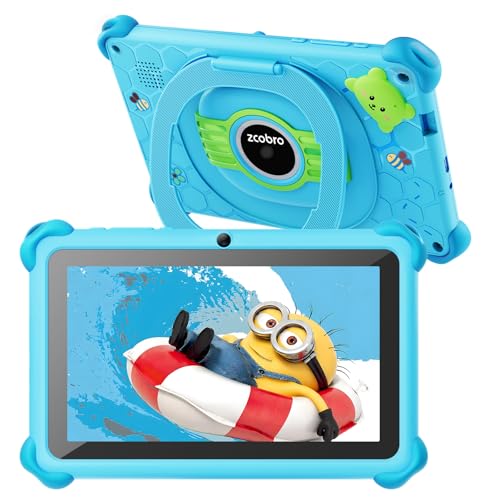
zcobro Kids Tablet Toddler 7 inch Kids Learning Tablet 32GB WiFi Tablets with Shockproof Case, YouTube, GMS, Parental Control, Dual Camera for Boys Girls Preinstalled Educational Games, Blue
Check price on Amazon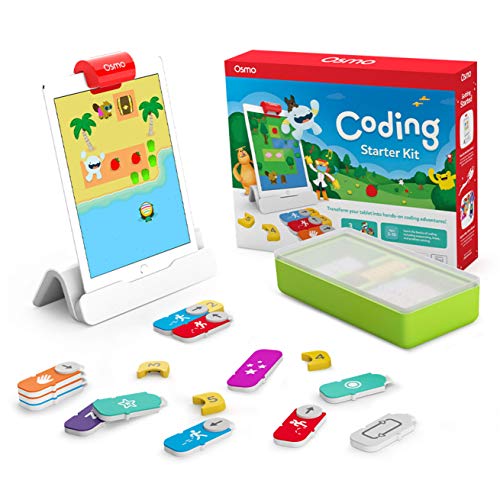
Osmo Coding Kit, Ages 5-10+, Coding for Kids, Learn to Code, STEM, iPad | Includes Osmo iPad base + 3 games teaching real coding logic, sequencing & problem-solving through hands-on puzzle play
Check price on Amazon![[2 Pack] Genialba LCD Writing Tablet 8.5-Inch Colorful Doodle Board, Toddler Learning Educational Toys Gifts for 3-8 Years Old Girls and Boys, Electronic Drawing Pad for Kids (Pink&Blue)](https://m.media-amazon.com/images/I/51FRZYJVy9L._SL500_.jpg)
[2 Pack] Genialba LCD Writing Tablet 8.5-Inch Colorful Doodle Board, Toddler Learning Educational Toys Gifts for 3-8 Years Old Girls and Boys, Electronic Drawing Pad for Kids (Pink&Blue)
Check price on AmazonFrequently Asked Questions
How much screen time is appropriate for a 6-year-old? The American Academy of Pediatrics recommends limiting screen time to 1-2 hours of high-quality programming per day for children aged 2-5, and for older children, establishing consistent limits. The key is to prioritize educational and interactive content over passive viewing.
Are free educational apps just as good as paid ones? Not always. Many free apps are supported by advertising, which can be distracting and sometimes inappropriate. Paid apps or those with a subscription model often provide a more robust, ad-free learning experience, making them a better long-term investment for your child's education.
How can I ensure my child is using the iPad safely? Set up guided access and screen time limits using the iPad's built-in parental controls. Create a "kids mode" that limits access to a curated list of approved apps. Also, have regular conversations with your child about digital citizenship and safety.